


A Mississauga steakhouse we audited last spring had a beautiful website. Custom photography, a proper reservation flow, the lot. It had also not touched its Google Business Profile since 2021. Hours were wrong for two statutory holidays, the menu link pointed at a PDF that no longer existed, and there were nine photos, four of them uploaded by customers.
That profile was getting roughly eleven times more views than the website. Almost nobody clicked through, because they did not need to. They looked, judged, and picked the place two doors down with forty photos and current hours.
This is the part restaurant owners consistently get backwards. The website is where you send people. The profile is where they decide. Restaurants with complete, active profiles reportedly see around 70% more visits than those with incomplete ones, and it costs nothing but attention.
Below: what to fill in, what to photograph, how the map pack actually picks winners, and the fields most restaurants leave blank. If you are also running ads, read this alongside how much a restaurant should spend on Google Ads, because the two feed each other more than most people realise.
Why does a Google Business Profile matter more than a restaurant website?
Because most people never reach the website. They search, scan the map results, look at photos, check hours, and decide inside a minute. The profile is where that decision happens, and it is free.
Think about how you personally pick somewhere to eat in an unfamiliar area. You search, you look at the three results on the map, you tap one, you look at pictures. If the food looks good and it is open, you go. You almost never visit the restaurant's actual website.
Your guests behave the same way. That makes the profile the highest-traffic asset you own, and the one most likely to be years out of date.
It also decides whether your ads work
People who see your paid search ad frequently check your profile before calling. A thin profile with stale hours undercuts every click you have paid for, which is why we will not scale a Google Ads account for a restaurant whose profile is a mess. You would be buying traffic into a bad first impression.
- ~70%
- more visits reported for complete profiles
- $0
- cost to set up and maintain
- 3
- map pack slots worth competing for
How do you set up a restaurant Google Business Profile correctly?
Claim and verify the listing, pick the most specific primary category, fill in hours including holidays, add menu and ordering links to your own site, complete every attribute, then load thirty or more photos.
Order matters less here than completeness. Google rewards profiles that answer every question a guest might have, and every blank field is a reason to rank somebody else instead.
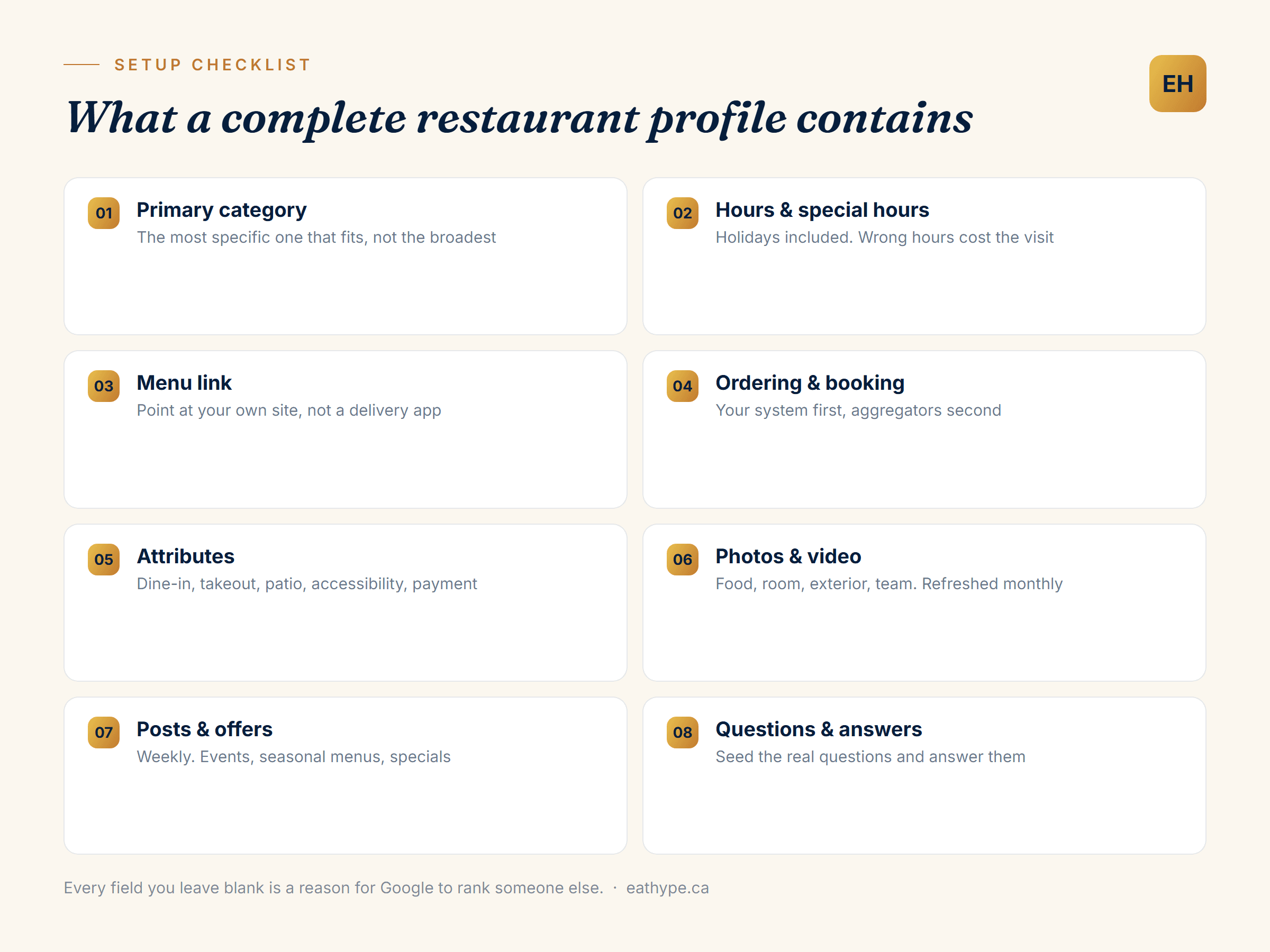
Pick the most specific primary category
This is the biggest ranking lever you control, and most restaurants get it wrong by being too broad. “Restaurant” puts you in a category with everything that serves food. “Sri Lankan restaurant” or “Neapolitan pizza restaurant” puts you in a much smaller pool where you can actually win.
Add secondary categories for what you genuinely also are: caterer, bar, breakfast restaurant, takeout. Do not stuff categories you cannot back up. Google cross-checks against your reviews and photos, and mismatches hurt.
Get hours right, including the awkward ones
Special hours for statutory holidays are the field almost everyone forgets. Someone drives over on Victoria Day, finds you closed, and leaves a one-star review about it. That review outlives the mistake by years.
If your kitchen closes before the room does, say so. Guests arriving at 9:45pm for a kitchen that shut at 9:30 is a preventable bad review.
Point menu and ordering links at your own site
Google lets you add menu, ordering and reservation links. Default them to your own restaurant website, not a delivery aggregator. Every order routed through your own system is one you keep the full margin on, and the profile is the cheapest place to reclaim that traffic.
Fill in every attribute
Dine-in, takeout, delivery, outdoor seating, wheelchair accessible, accepts reservations, good for groups, payment types. These feed filters people actually use, and a missing attribute quietly removes you from those results. It takes ten minutes once.
What photos does a restaurant profile need?
At least thirty, weighted toward food, refreshed monthly. Phone photos of real plates beat polished stock, and the exterior shot matters more than owners expect because people use it to find the door.
Photos are the most neglected field and the one guests judge fastest. Nine images, four of them blurry customer uploads, tells somebody your restaurant is either new or not paying attention. Neither helps.
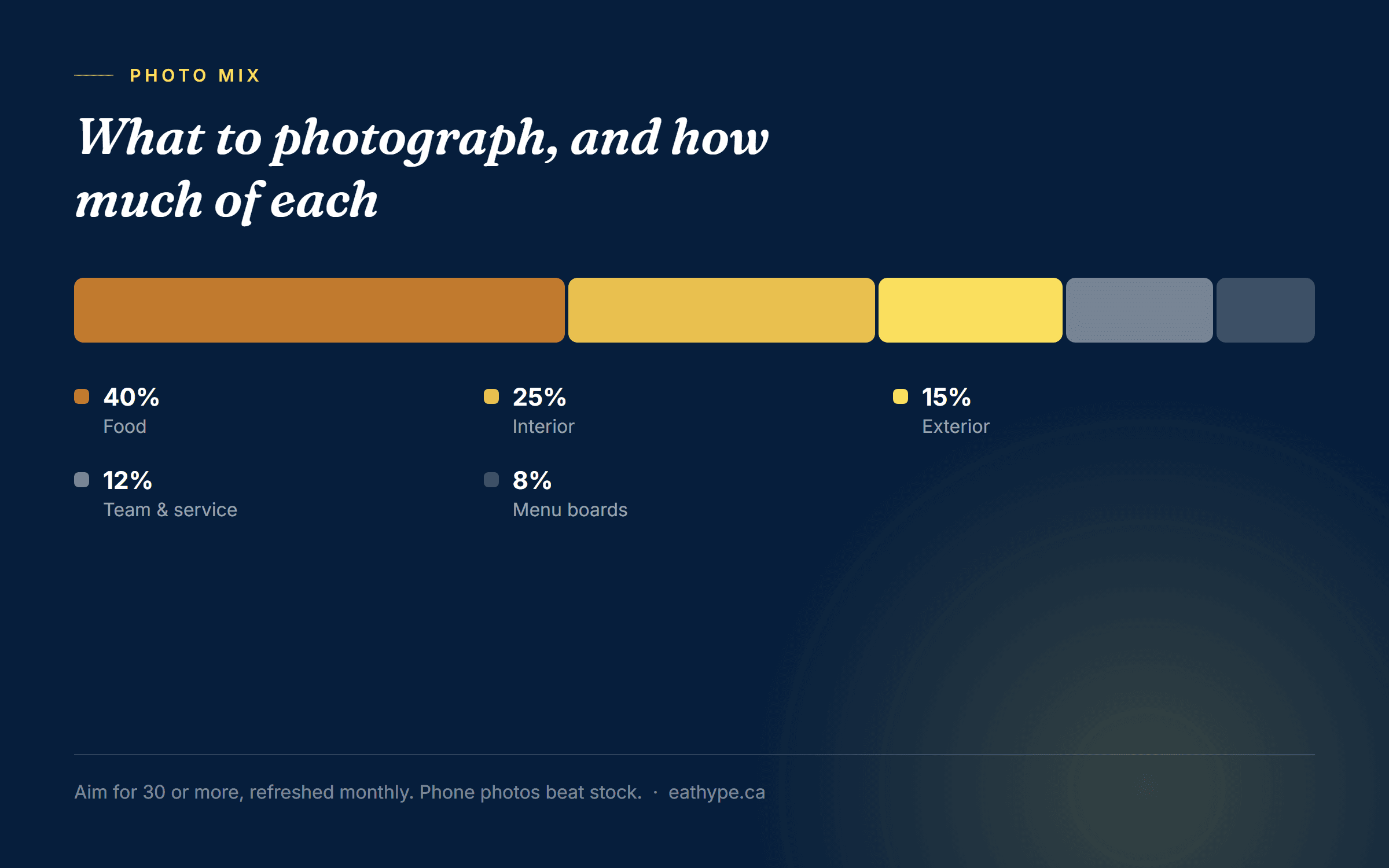
- **Food, and lots of it.** Your signature dishes, shot in daylight near a window. This is what people scroll for.
- **The room, occupied.** An empty dining room reads as dead. Shoot during service with people in it.
- **The exterior, from the street.** People genuinely use this to find your door, especially in strip malls and side streets.
- **Team and service.** Faces build trust faster than plates do, and they signal a real business.
- **Menu boards or printed menus.** Useful, and they help Google associate you with dish keywords.
Upload a few every month rather than forty once. Recency is a signal, and a profile that has not been touched in a year looks abandoned to both Google and guests.
One honest warning: bad photos are worse than fewer photos. A dark, yellow-tinted plate shot under tungsten light will cost you visits. If phone photography is not your thing, one afternoon with someone who can shoot food properly pays for itself.
How do you get more reviews without breaking Google's rules?
Ask every satisfied guest, immediately, with a direct link. Never offer discounts or free items in exchange, never filter for positive reviewers only, and reply to everything, including the bad ones.
Reviews drive both ranking and conversion, and restaurants leave them almost entirely to chance. The single most effective change is asking at the right moment: when the guest is happy and still in the room, not three days later by email.
- 01Generate your short review link from the profile dashboard and turn it into a QR code.
- 02Put it on the bill folder, the receipt, and a small table card. Not a giant sign, which reads as desperate.
- 03Train staff to ask once, verbally, when a guest says the meal was good. That sentence is the whole system.
- 04Reply to every review within a couple of days. Google treats responses as an engagement signal, and prospective guests read your replies more carefully than the reviews.
- 05For a bad review, respond once, briefly, without arguing. You are writing for the hundred people who will read it later, not the one who wrote it.
What will get you penalised
Offering anything of value for a review breaches Google's policy, and it is the most common thing restaurants get quietly punished for. So is review gating, where you screen guests and only send happy ones to Google. Buying reviews is worse, and increasingly detectable. None of this is worth the risk against a listing you depend on.
We finally know what brings in bookings. Eat Hype cleaned up our ads, added tracking, and showed us clear numbers every week. We stopped guessing and started seeing results.
Why is your restaurant not showing in the map pack?
Usually proximity, category or thin engagement. Google weighs relevance, distance and prominence, and distance is the one you cannot change. The other two are almost always where the problem sits.
The map pack shows three results. Getting into it is worth more than any other organic position for a restaurant, because it appears above everything else and carries directions and calls built in.
| Factor | Can you change it? | What to actually do |
|---|---|---|
| Distance from the searcher | No | Stop optimising for the whole city. Win your radius first. |
| Primary category | Yes | Go specific. Cuisine plus format beats generic 'Restaurant'. |
| Review volume and recency | Yes | Steady flow beats a burst. Ask every shift. |
| Profile completeness | Yes | Fill every field. Blanks cost you. |
| Photo activity | Yes | Add a few monthly rather than forty once. |
| Website relevance | Yes | Real pages for your dishes and neighbourhood, not one thin page. |
Distance is fixed. Everything else in this table is work you can do this week.
If you rank well from the restaurant itself but vanish from two kilometres away, that is proximity, and it is normal. The fix is not the profile, it is broader restaurant SEO so your site earns visibility beyond the immediate radius, plus paid search to cover the gap while that builds.
Multiple locations need separate profiles
One profile per physical address, each with its own hours, photos and reviews. Do not share a single profile across sites or point several at one address. Google handles this badly and you lose the map pack in every city you are not physically in.
How do you keep the profile working after setup?
Treat it as a monthly job, not a one-time task. Post weekly, add photos monthly, check hours before every holiday, reply to reviews within days, and audit the whole listing quarterly.
Setting it up is an afternoon. Keeping it ranked is a habit, and it is a small one.
- **Weekly:** one Post. A special, an event, a seasonal dish. Posts expire, so a profile with no recent Posts reads as inactive.
- **Monthly:** three to five new photos, and a scan of new reviews for anything unanswered.
- **Before every holiday:** set special hours. Put a recurring reminder in the calendar now.
- **Quarterly:** re-check categories, attributes and links. Menu links break silently more often than you would think.
- **Ongoing:** watch the Q&A section. Anyone can post an answer there, including people who are wrong.
That Q&A point deserves emphasis. Competitors and confused strangers can answer questions about your restaurant, and their answers show publicly. Seed the common questions yourself, answer them properly, and check monthly that nobody has added something inaccurate.
If you want to know whether any of this is working, connect the profile's insights to whatever you use for reporting. Calls, direction requests and website clicks from the profile are real demand signals, and they belong in your performance dashboards next to everything else rather than sitting in a tab nobody opens. Getting that plumbing right is what tracking setup covers.
Restaurant Google Business Profile: common questions
Is Google Business Profile the same as Google My Business?
Yes. Google renamed My Business to Business Profile, and management moved into Search and Maps directly. Older guides using the previous name describe the same product.
How long does it take to rank in the map pack?
Profile fixes can shift rankings within two to four weeks. Review volume and website authority take longer, usually a few months, and proximity never changes.
How many photos should a restaurant upload?
Thirty or more to start, then three to five new ones monthly. Weight them toward food, shot in daylight. Recency counts, so a steady trickle beats one large upload.
Can I offer a discount for leaving a review?
No. Offering anything of value in exchange for reviews breaches Google's policy and risks your reviews being removed or the listing penalised. Ask verbally instead, when the guest is happy.
Should my menu link go to my website or a delivery app?
Your own website. Orders through your own system keep the full margin, and you own the customer relationship rather than renting it from an aggregator.
Do I need a separate profile for each location?
Yes, one per physical address, each with its own hours, photos and reviews. Sharing a profile across sites costs you map pack visibility in every city you are not physically located in.
Does posting on Google Business Profile actually help?
It helps engagement and keeps the listing looking active, which supports ranking indirectly. Posts expire after a week, so consistency matters more than any individual post.